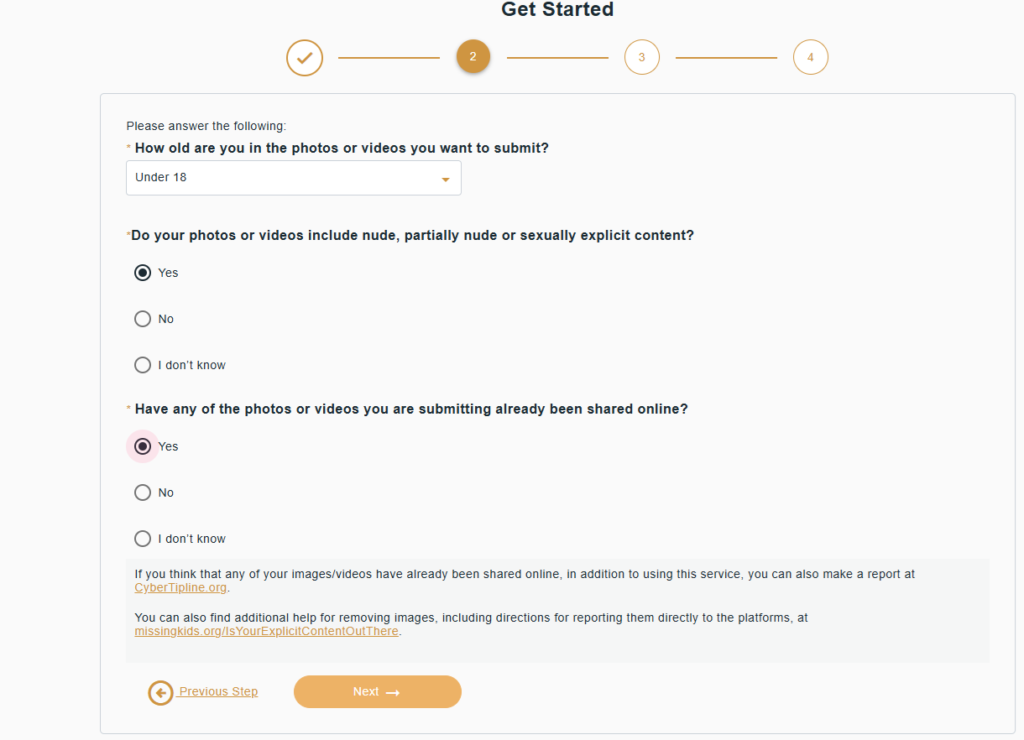
In today’s digital age, the unauthorized spread of private images (Nude or Sexually Explicit images) of children and teenagers on the internet is a major threat. To combat this, the National Center for Missing and Exploited Children (NCMEC) has introduced a free service called ‘Take It Down’
Here’s a step-by-step guide on how you can use this website to remove private images of yourself or someone you know from the internet.
What is ‘Take It Down’?
This platform helps prevent the spread of private images or videos taken when someone was under 18 years old. It works in collaboration with major social media platforms like Facebook, Instagram, and TikTok.
How to Use It? (Step-by-Step Guide)
Step 1: Visit the Website First, visit the website tidsubmit.ncmec.org or takeitdown.ncmec.org. The site is available in multiple languages, including English.
Step 2: Click ‘Get Started’ Click the ‘Get Started’ button on the homepage. This will lead you to the reporting process.
Step 3: Select Images Choose the images or videos from your device (mobile/laptop) that you wish to have removed from the internet.
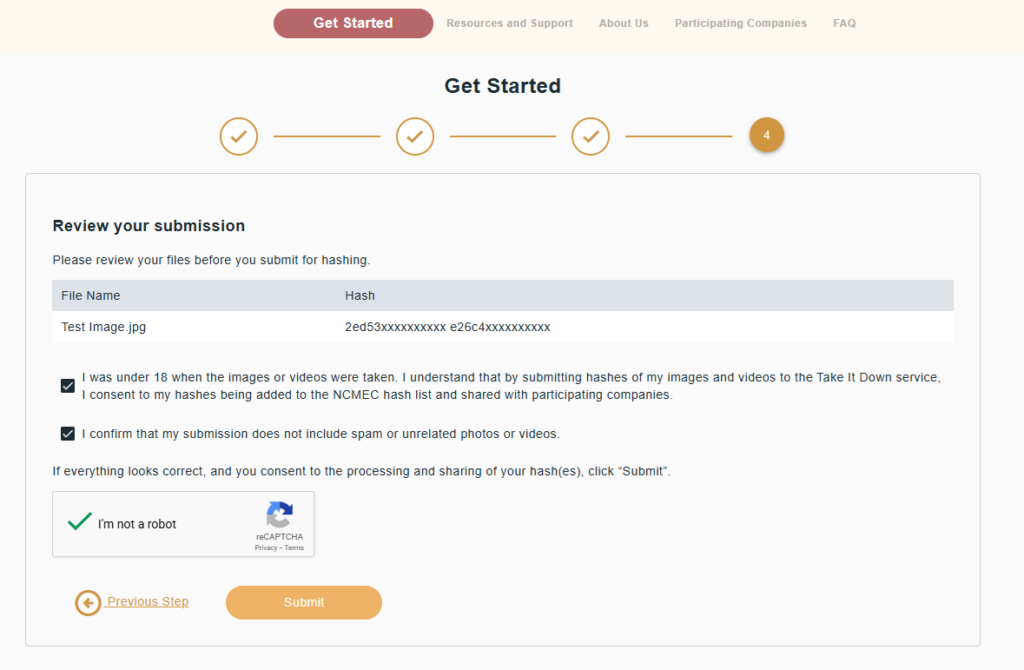
Important Note: Your actual images are never uploaded to this website. Instead, the website generates a digital fingerprint (Hash Value) for the image. This ensures your privacy is fully protected.
Step 4: Submit the Hash The ‘digital fingerprint’ of your selected image is then submitted to NCMEC. Social media companies can use this hash to check if the image exists on their platforms and subsequently remove it.
Key Features You Should Know:
Stay Anonymous: You do not need to provide your name or any other personal information.
No Image Transfer: Your private images are not viewed by anyone, and they remain securely on your device.
Free Service: There is no charge for using this service.
Who can use it?
Children under 18 years old.
Parents or guardians on behalf of children.
Adults who fear that images taken before they turned 18 are now on the internet.
Conclusion
Don’t hesitate to prevent the misuse of your images online. Use secure methods like ‘Take It Down’ to ensure your digital safety. If you find this article helpful, please share it with others.
To stop the spread of non-consensual intimate images (NCII), the tool StopNCII.org uses a privacy-first technology called “hashing.” This allows you to protect your images without ever having to upload the actual files to a server.+1
Here is a step-by-step guide on how to use the service:
Step 1: Check Eligibility
Before you begin, ensure your situation meets the platform’s criteria:
Age: You must be 18 or older now, and you must have been 18 or older when the image was taken. (If you are under 18, use the Take It Down tool instead).
Content: The images or videos must be intimate (nude, semi-nude, or sexual acts).
Possession: You must have the original files on your device to create the case.
Step 2: Select Your Media
Navigate to StopNCII.org and click “Create Your Case.” You will be prompted to select the intimate images or videos directly from your phone or computer gallery.
Important: Your images do not leave your device. The website scans them locally to create a “digital fingerprint.”
Step 3: Generate the “Hash” (Digital Fingerprint)
Once you select the files, the tool uses an algorithm to generate a Hash—a unique string of numbers and letters that represents the image.
This hash is sent to StopNCII.org, but the actual image stays on your device. If an exact copy of that image is uploaded to a participating platform, the system will recognize the hash and block it.
After submitting the hashes, you will be given a Case Number and a PIN.
Write these down immediately. * StopNCII.org does not store your personal details (like your name), so if you lose this information, you cannot recover it or check your case status later.
Step 5: Automated Platform Review
The hashes are shared with participating partners (such as Facebook, Instagram, TikTok, OnlyFans, Bumble, and Reddit).
If someone tries to upload an image that matches your hash, it will be flagged for moderation.
If the image violates the platform’s policy, it will be removed or blocked from being shared.
Step 6: Check Progress
You can return to the website at any time and use your Case Number and PIN to see the status of your case. It usually takes a few days for the hashes to be fully integrated across all partner platforms.
This video provides a visual walkthrough of the hashing process and explains how the tool protects your privacy while blocking images from major social platforms.